Clrinject injects C# EXE or DLL Assembly into any CLR runtime and AppDomain of another process. The injected assembly can then access static instances of the injectee process’s classes and therefore affect it’s internal state.
Also ReadDocker Tor Hidden Service Nginx – Easily Setup A Hidden Service Inside The Tor Network
Clrinject Usage
clrinject-cli.exe -p <processId/processName> -a <assemblyFile>
Opens process with id <processId> or name <processName>, inject <assemblyFile> EXE and execute Main method.
Additional Options
-eEnumerates all loaded CLR Runtimes and created AppDomains.-d <#>Inject only into<#>-th AppDomain. If no number or zero is specified, assembly is injected into every AppDomain.-i <namespace>.<className>Create an instance of class<className>from namespace<namespace>.
Examples
Usage examples
clrinject-cli.exe -p victim.exe -e(Enumerate Runtimes and AppDomains from victim.exe)clrinject-cli.exe -p 1234 -a "C:\Path\To\invader.exe" -d 2(Inject invader.exe into second AppDomain from process with id 1234)clrinject-cli.exe -p victim.exe -a "C:\Path\To\invader.dll" -i "Invader.Invader"(Create instance of Invader inside every AppDomain in victim.exe)clrinject-cli64.exe -p victim64.exe -a "C:\Path\To\invader64.exe"(Inject x64 assembly into x64 process)
Injectable assembly example
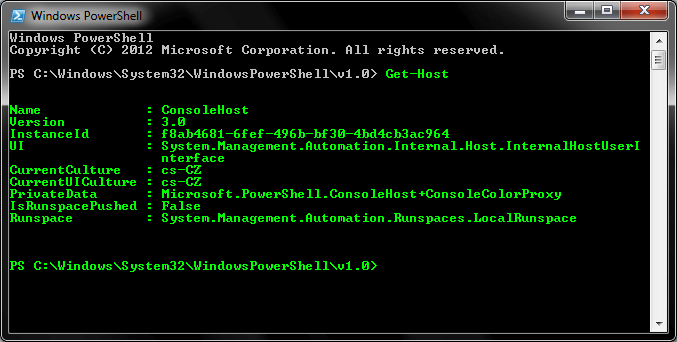
Following code can be compiled as C# executable and then injected into a PowerShell process. This code accessees static instances of internal PowerShell classes to change console text color to green.
using System;
using System.Reflection;

using Microsoft.PowerShell;
using System.Management.Automation.Host;

namespace Invader
{
    class Invader
    {
        static void Main(string[] args)
        {
            try
            {
                var powerShellAssembly = typeof(ConsoleShell).Assembly;
                var consoleHostType = powerShellAssembly.GetType("Microsoft.PowerShell.ConsoleHost");
                var consoleHost = consoleHostType.GetProperty("SingletonInstance", BindingFlags.Static | BindingFlags.NonPublic).GetValue(null);

                var ui = (PSHostUserInterface)consoleHostType.GetProperty("UI").GetValue(consoleHost);
                ui.RawUI.ForegroundColor = ConsoleColor.Green;
            }
            catch (Exception e)
            {
                Console.WriteLine(e.ToString());
            }
        }
    }
}
Injection command:
clrinject-cli64.exe -p powershell.exe -a "C:\Path\To\invader64.exe"
Result: