


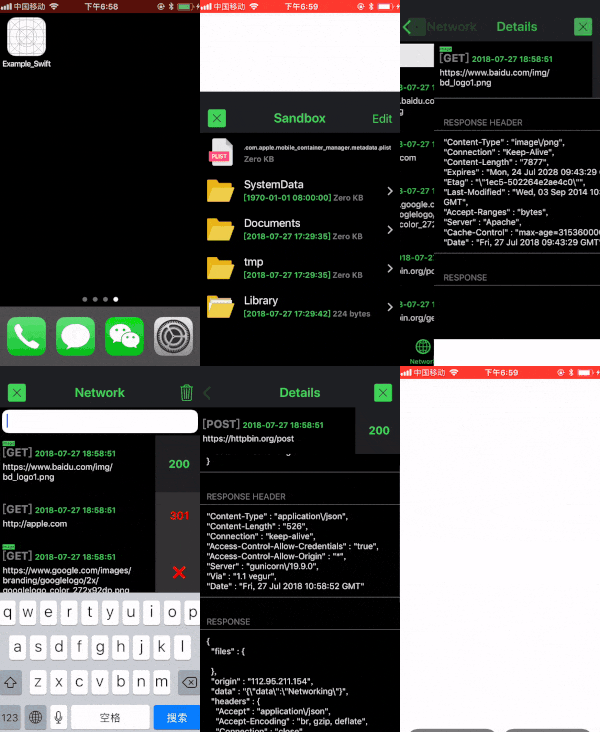
CocoaDebug is an iOS debugging tool with the following features;
- Shake to hide or show the black bubble. (support both device and simulator)
- Long press the black bubble to show
UIDebuggingInformationOverlay. (Apple’s Private API, support iOS 10/11/12) - Application memory usage and FPS.
- List all
print()andNSLog()messages which have been written by developer in Xcode. (optional) - List of all the network requests sent by the application. (optional)
- List crash errors. (optional)
- Share network details via email or copy to clipboard when you are in the Network Details page.
- Copy logs. (long press the text, then select all or select copy)
- Search logs by keyword.
- List application and device informations, including: version, build, bundle name, bundle id, screen resolution, device, iOS version
- List all sandbox folders and files, supporting to preview and edit.
- List HTML logs, including
console.log(),console.debug(),console.warn(),console.error(),console. info(). (support bothWKWebViewandUIWebView). (optional) - Support
JSONand Google’sProtocol buffers
Also Read : Yaazhini – Free Android APK & API Vulnerability Scanner
Installation
CocoaPods
platform :ios, ‘8.0’
use_frameworks!
target ‘YourTargetName’ do
pod ‘CocoaDebug’, :configurations => [‘Debug’]
end
Carthage
github “CocoaDebug/CocoaDebug”
WARNING: Don’t submit .ipa to AppStore which has been linked with the CocoaDebug.framework. This Integration Guide outline a way to use build configurations to isolate linking the framework to Debug builds only.
Usage
//Step 1. (AppDelegate.swift)
if DEBUG
import CocoaDebug
endif
//Step 2. (AppDelegate.swift)
if DEBUG
CocoaDebug.enable()
endif
//Step 3. (AppDelegate.swift)
public func print(file: String = #file, function: String = #function, line: Int = #line, _ message: T, color: UIColor = .white) {
#if DEBUG
swiftLog(file, function, line, message, color, false)
#endif
}
Objective-C
//Step 1. (AppDelegate.m)
ifdef DEBUG
@import CocoaDebug;
endif
//Step 2. (AppDelegate.m)
ifdef DEBUG
[CocoaDebug enable];
endif
//Step 3. (PrefixHeader.pch)
ifdef DEBUG
#import “_ObjcLog.h”
//#import //if use framework
endif
//Step 4. (PrefixHeader.pch)
ifdef DEBUG
#define NSLog(fmt, …) [_ObjcLog logWithFile:__FILE__ function:__FUNCTION__ line:__LINE__ color:[UIColor whiteColor] unicodeToChinese:NO message:(fmt), ##__VA_ARGS__]
else
#define NSLog(fmt, …) nil
endif
Please check Example_Swift.xcodeproj and Example_Objc.xcodeproj for more advanced usage.
NOTE: Be careful with Other Swift Flags & Preprocessor Macros when using Swift & Objective-C in one project. You can refer to here.
Parameters
When you initialize CocoaDebug, you can customize the following parameter values before CocoaDebug.enable().
serverURL– If the crawled URLs contain server URL ,set these URLs bold font to be marked. not mark when this value is nil. default value is nil.ignoredURLs– Set the URLs which should not crawled, ignoring case, crawl all URLs when the value is nil. default value is nil.onlyURLs– Set the URLs which are only crawled, ignoring case, crawl all URLs when the value is nil. default value is nil.tabBarControllers– Set controllers to be added as child controllers of UITabBarController. default value is nil.logMaxCount– The maximum count of logs which CocoaDebug display. default value is 1000.emailToRecipients– Set the initial recipients to include in the email’s “To” field when share via email. default value is nil.emailCcRecipients– Set the initial recipients to include in the email’s “Cc” field when share via email. default value is nil.mainColor– Set the main color with hexadecimal format. default value is #42d459.