How EDR Killers Bypass Security Tools
By 0xSnow on March 19, 2026


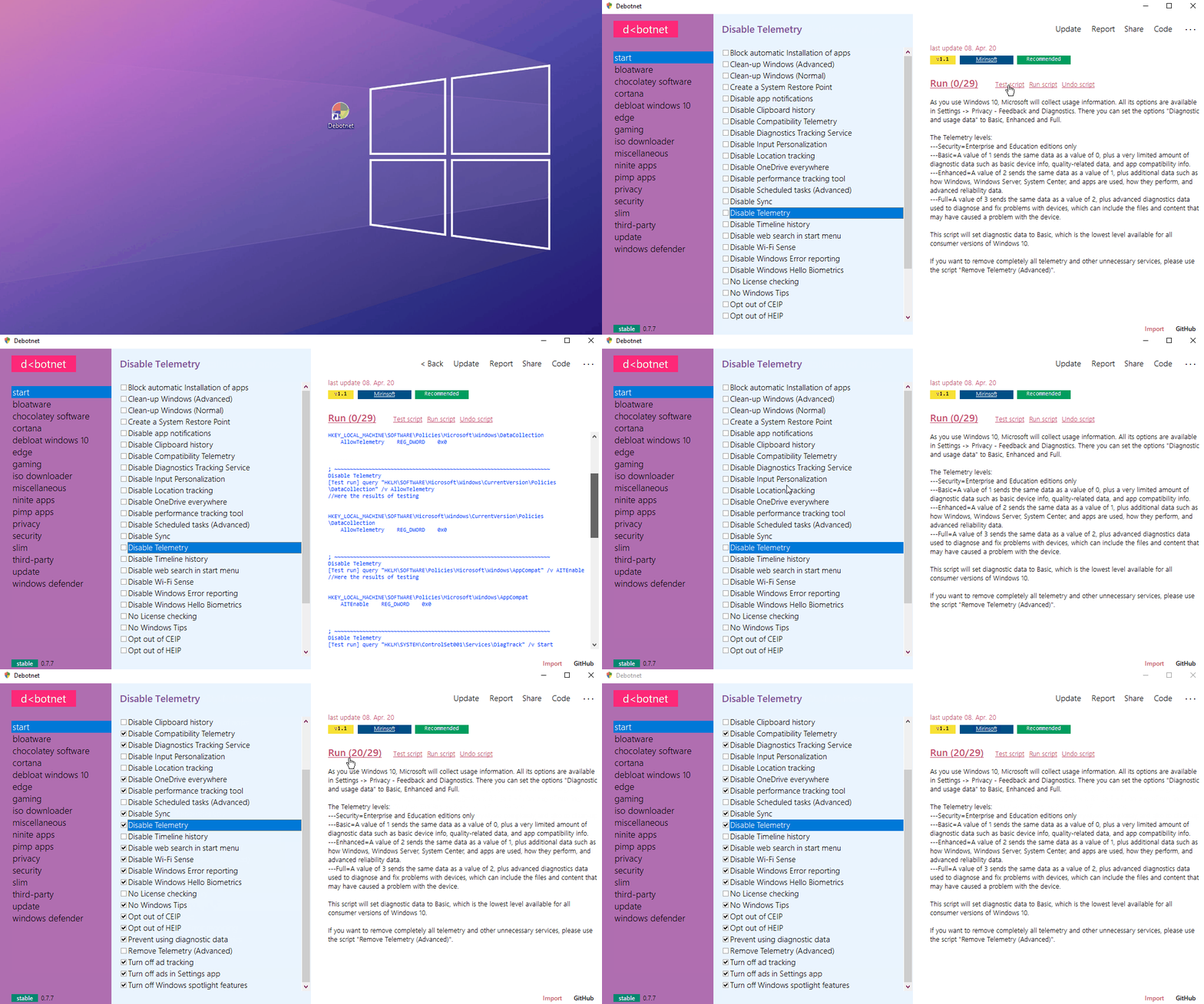
Windows 10 ships with telemetry, diagnostic data collection, and background communication services enabled by default. These services transmit system activity, browsing behavior, and application usage data to Microsoft servers on a continuous basis. Debotnet is a free, portable Windows utility that lets you disable these tracking features, apply registry-based privacy rules, and execute custom debloat scripts entirely through a transparent scripting system.
Developed by mirinsoft, the tool exposes every action it takes through plaintext script files rather than hiding operations inside compiled code. You can review the complete source archive and its privacy rule scripts on the official Debotnet GitHub repository. Unlike black-box optimizers that apply changes silently, Debotnet shows you every registry key and service it touches.
Windows 10 collects several data categories by default without requiring explicit user consent for each collection event. Diagnostic data includes error reports, hardware details, software inventory, and keypress timing patterns used by Microsoft’s handwriting recognition systems.
Background services like Connected User Experiences and Telemetry (DiagTrack) and the Windows Consumer Experience Improvement Program run as persistent scheduled tasks. These survive standard privacy setting toggles in the Windows Settings UI.
The telemetry level matters significantly. Home edition users cannot set telemetry to level 0 (Security). The minimum available level on Home editions is level 1 (Basic), which still allows hardware, software, and basic diagnostics collection. Debotnet uses registry policy keys that function on all Windows 10 editions, bypassing this Home edition restriction.
Debotnet requires no installation. Download the portable executable, extract the archive, and launch the application directly. No system paths are modified until you explicitly run a script.
The tool supports both 32-bit and 64-bit Windows 10 editions. Debotnet uses plain .DS1 script files that define registry modifications, file deletions, service actions, and PowerShell command sequences. You can open any script in Notepad before running it to verify every operation.
REM Example Debotnet .DS1 script section
[Info]
ID=Disable DiagTrack Service
Ver=1.2
Desc=Disables the Connected User Experiences and Telemetry service.

[Code]
Task1=Reg,add "HKLM\SYSTEM\CurrentControlSet\Services\DiagTrack" /v Start /t REG_DWORD /d 4 /f,STDOUT
Task2=Cmd,sc stop DiagTrack,STDOUT
Running Debotnet in Test/Debug mode previews all registry writes and command executions without applying any changes. This lets administrators audit every planned operation before committing modifications to production systems.
One of the most requested privacy scripts covers forced update behavior. Windows 10 automatically downloads and installs updates without user confirmation on Home editions, including reboots during active work sessions.
[Info]
ID=No more forced updates
Ver=1.0
Desc=Notifies when updates are available and waits for user approval before installing.

[Code]
Task1=Try,query "HKLM\SOFTWARE\Policies\Microsoft\Windows\WindowsUpdate\AU" /v AUOptions,STDOUT
File2=Reg,add "HKLM\SOFTWARE\Policies\Microsoft\Windows\WindowsUpdate\AU" /v NoAutoUpdate /t REG_DWORD /d 0 /f,STDOUT
File3=Reg,add "HKLM\SOFTWARE\Policies\Microsoft\Windows\WindowsUpdate\AU" /v AUOptions /t REG_DWORD /d 2 /f,STDOUT
Setting AUOptions to 2 configures automatic update notification without automatic installation. You remain in full control of the timing.
Debotnet extends beyond its own script library through third-party PowerShell integration. Established community debloat scripts like W4RH4WK/Debloat-Windows-10 and Sycnex/Windows10Debloater import directly into Debotnet’s execution engine.
Software installation integrates through both Ninite and Chocolatey, which provides access to over 4,000 community-maintained application packages. Running a fully clean Windows setup with privacy-hardened settings and automated software provisioning takes under an hour using these combined features.
# Install Debotnet via Chocolatey package manager
choco install debotnet
Note that Debotnet development has been discontinued by the original author. The source code remains public under the mirinsoft/debotnet repository. Active maintainers can fork and continue development. Successor tools from the same author, including SharpApp and Spydish, offer similar functionality with continued support on modern Windows environments.


.jpg "The Evolution of Online Finance Tools In a Tech-Driven World")