

How EDR Killers Bypass Security Tools
By 0xSnow on March 19, 2026


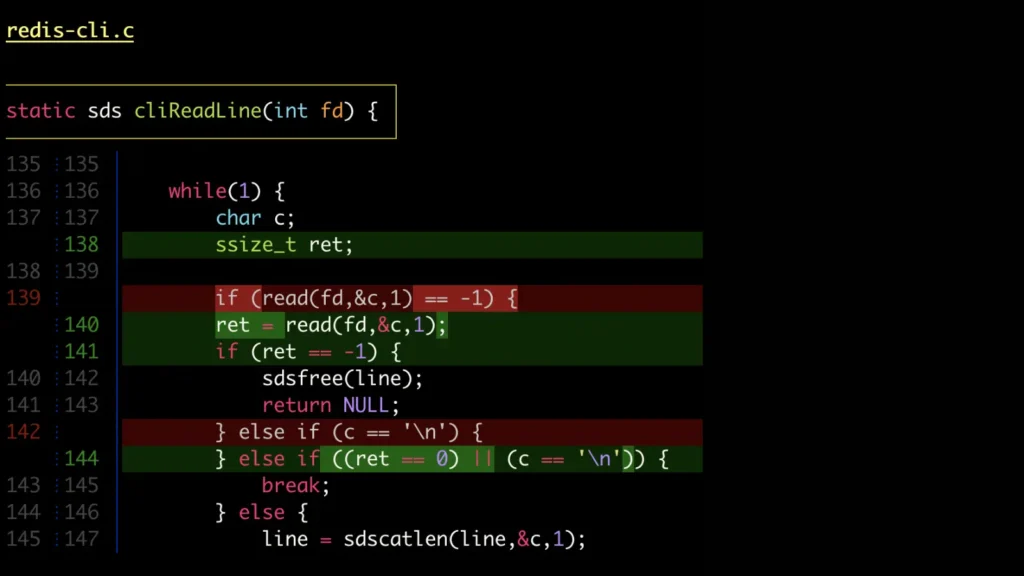
Delta is a syntax-highlighting pager that makes Git diffs and command-line output easier to read. Written in Rust, it improves the way developers review code changes by adding language-aware highlighting, word-level comparisons, side-by-side layouts, and navigation controls.
Instead of examining plain diff output, developers can use Delta to identify modified lines, compare code changes, and review large patches more efficiently. It integrates with Git and supports workflows involving commands such as git diff, git show, and git grep.
Delta applies language-specific syntax highlighting to code differences using themes compatible with bat. This makes additions and deletions easier to distinguish, particularly when reviewing changes across multiple programming languages.
Line-level comparisons do not always show exactly what changed within a modified line. Delta can highlight individual words and smaller sections of text, helping developers identify edits without comparing the entire line manually.
The side-by-side layout displays the original and modified versions of a file next to each other. Line numbers and automatic wrapping improve readability, especially when reviewing long lines or substantial code changes.
Delta improves the presentation of merge conflicts, making conflicting sections easier to identify during code reviews and branch integration. Developers can inspect the affected lines more clearly before resolving conflicts.
Navigation key bindings, including n and N where supported by the configured navigation mode, help users move between diff sections. Delta can also format commit hashes and file paths as clickable hyperlinks when the terminal supports them and the relevant options are configured.
Delta offers extensive customization for colors, diff markers, commit headers, file names, and other interface elements. Users can adjust themes and styles to match their terminal environment and improve contrast.
Delta works with common Git commands and can be used with compatible grep workflows, including rg and git grep. It also supports Git’s --color-moved feature, which helps identify code that has been relocated rather than newly written.
Delta runs on Linux, macOS, and Windows. It is available through many package managers under the name git-delta, although the exact installation command depends on the operating system and package source.
Install Delta using a package manager supported by your operating system, or follow the instructions in the official Delta GitHub repository. After installation, confirm that the delta executable is available in your terminal.
Set Delta as Git’s default pager with the following command:
git config --global core.pager delta
Enable side-by-side output and a dark theme with these settings:
git config --global delta.side-by-side true
git config --global delta.dark true
To enable navigation features, add the following setting:
git config --global delta.navigate true
These commands update your global Git configuration. You can inspect the resulting settings with:
git config --global --get core.pager
git config --global --get-regexp '^delta\.'
Alternatively, configure the options directly in your ~/.gitconfig file:
[core]
    pager = delta
[delta]
navigate = true side-by-side = true dark = true
For more command-line workflow improvements, explore our guide to Git fetch vs. Git pull to understand how these commands differ when synchronizing repositories.
Once configured, Delta can enhance the output of everyday Git operations:
git diff
git show HEAD
git log -p
These commands let you review working-tree changes, inspect a commit, and examine historical patches with improved formatting. The exact appearance depends on your Delta configuration, terminal capabilities, and Git settings.
Delta is a useful addition to command-line development environments because it combines readable syntax highlighting, detailed change comparisons, and flexible navigation. Its configurable display and Git integration make reviewing patches and tracking code changes more convenient for developers working across different repositories.


.jpg "The Evolution of Online Finance Tools In a Tech-Driven World")


