

How EDR Killers Bypass Security Tools
By 0xSnow on March 19, 2026


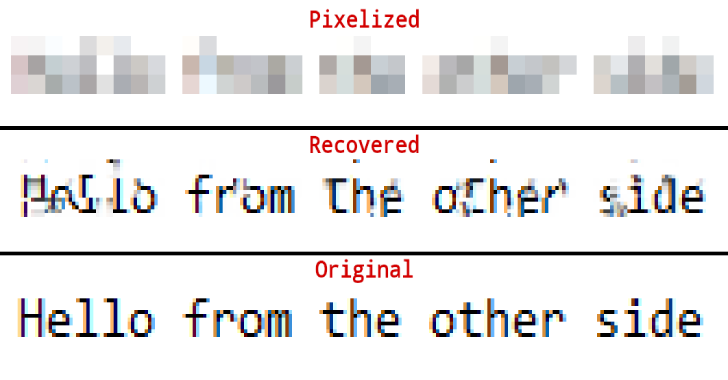
Depix is an open-source image analysis tool designed to recover text from certain pixelated screenshots. It attempts to reconstruct obscured characters by comparing pixelated image blocks against a reference image containing a known sequence of characters.
The tool focuses on images created using a linear box filter, a pixelization technique that processes image regions in separate blocks. Depix uses this property to identify possible matches between the obscured text and a reference sequence. Its results depend heavily on how the original image was pixelated and how closely the reference image reproduces the original text formatting.
Pixelization is commonly used to conceal sensitive information in screenshots, including passwords, usernames, and other text. However, pixelization does not always provide reliable protection. Some techniques preserve enough visual information for parts of the original content to be inferred or reconstructed.
Depix explores one specific weakness: text obscured through linear box-filter pixelization. It compares the pixelated blocks with corresponding blocks generated from a reference image. This makes it a specialized recovery tool rather than a universal solution for reversing every type of image redaction.
Depix attempts to identify characters hidden behind pixelation by analyzing individual image blocks. Its matching process works best when the pixelated region follows the expected linear box-filter behavior.
The tool uses a search image containing a known character sequence. The reference can be generated using a De Bruijn sequence, which provides a structured arrangement of characters designed to help identify matching patterns.
For meaningful comparisons, the reference image should closely reproduce the original text appearance. Font family, font size, spacing, color, and rendering conditions can all influence the matching results.
Individual pixel blocks may produce more than one possible match. Depix uses the spatial relationships between neighboring blocks to narrow down these possibilities.
It first identifies blocks with unique matches and treats them as likely correct candidates. The algorithm then checks whether possible matches for surrounding blocks maintain the same geometric distances observed in the pixelated image. This process is repeated to resolve additional candidates.
After evaluating the available matches, Depix produces an output image containing reconstructed blocks. Where multiple candidates remain, the implementation uses an average of the matching results rather than claiming certainty about the original characters.
The recovery process relies on the behavior of the linear box filter. Since the filter processes image blocks separately, Depix can compare each obscured block with blocks generated from the reference search image.
The algorithm follows a matching process:
This approach can recover information from compatible examples, but it does not guarantee accurate reconstruction. Differences in fonts, antialiasing, screenshot tools, image scaling, or pixelization settings can reduce the number of useful matches.
The project’s original example uses a pixelated test image, a reference search image, and an output filename:
python depix.py -p images/testimages/testimage3_pixels.png -s images/searchimages/debruinseq_notepad_Windows10_closeAndSpaced.png -o output.png
The command uses three arguments:
-p specifies the pixelated image region.-s specifies the reference search image.-o specifies the output image filename.For authorized testing with suitable sample images, the general workflow involves preparing a rectangular image containing the obscured text and a reference image with matching text-rendering settings. A De Bruijn sequence can help create a reference containing combinations of expected characters.
The reference should use settings close to those of the original screenshot, including font, size, spacing, and color. Using the same screenshot capture method may also help reduce rendering differences. These preparation details are important because the algorithm depends on visual similarity between the reference and the original content.
Depix is designed for a narrow class of pixelated images. It is not a general-purpose image deblurring tool, and it cannot reliably reverse strong redaction methods such as solid-color masking or properly applied opaque overlays.
Its results also depend on the availability of a suitable reference sequence. If the original font or rendering settings are unknown, matching becomes more difficult. Multiple possible matches may remain unresolved, and an output image should not be treated as proof of the original text.
For organizations handling passwords and confidential information, the safer approach is to remove sensitive content before sharing screenshots or cover it with an opaque, permanently flattened redaction. Blurring and pixelation should not be considered dependable methods for protecting secrets.
Depix is available as an open-source project on GitHub. The repository contains the implementation, sample images, and additional project information. The original research background is also discussed in the article Recovering Passwords From Pixelized Screenshots.
Security professionals can also explore WhatWeb, a tool for identifying technologies used by websites during authorized security assessments. While it serves a different purpose, it provides another example of how specialized tools support security analysis.
Depix demonstrates why pixelation should not be treated as a secure way to hide passwords or other sensitive text. Its block-matching approach is useful for understanding weaknesses in image-based redaction and highlights the importance of applying proper data protection before distributing screenshots.


