

How EDR Killers Bypass Security Tools
By 0xSnow on March 19, 2026


Netdata is an open-source, real-time performance and health monitoring platform designed to provide detailed visibility into systems, applications, containers, and infrastructure. It collects performance metrics and presents them through interactive web dashboards, helping administrators identify resource bottlenecks, investigate unexpected behavior, and monitor service health.
Unlike monitoring solutions that require extensive configuration before displaying useful information, Netdata uses monitoring agents and automatic discovery to collect many system metrics. It can operate independently or integrate with existing monitoring environments, making it useful for Linux administrators, developers, and DevOps teams.
Netdata supports monitoring across physical servers, virtual machines, containers, and supported operating systems. Its modular architecture also allows additional data collectors to monitor applications and services.
Netdata provides interactive dashboards that display system performance as continuously updated charts. Administrators can inspect resource usage, compare different metrics, and investigate performance changes without relying entirely on command-line utilities.
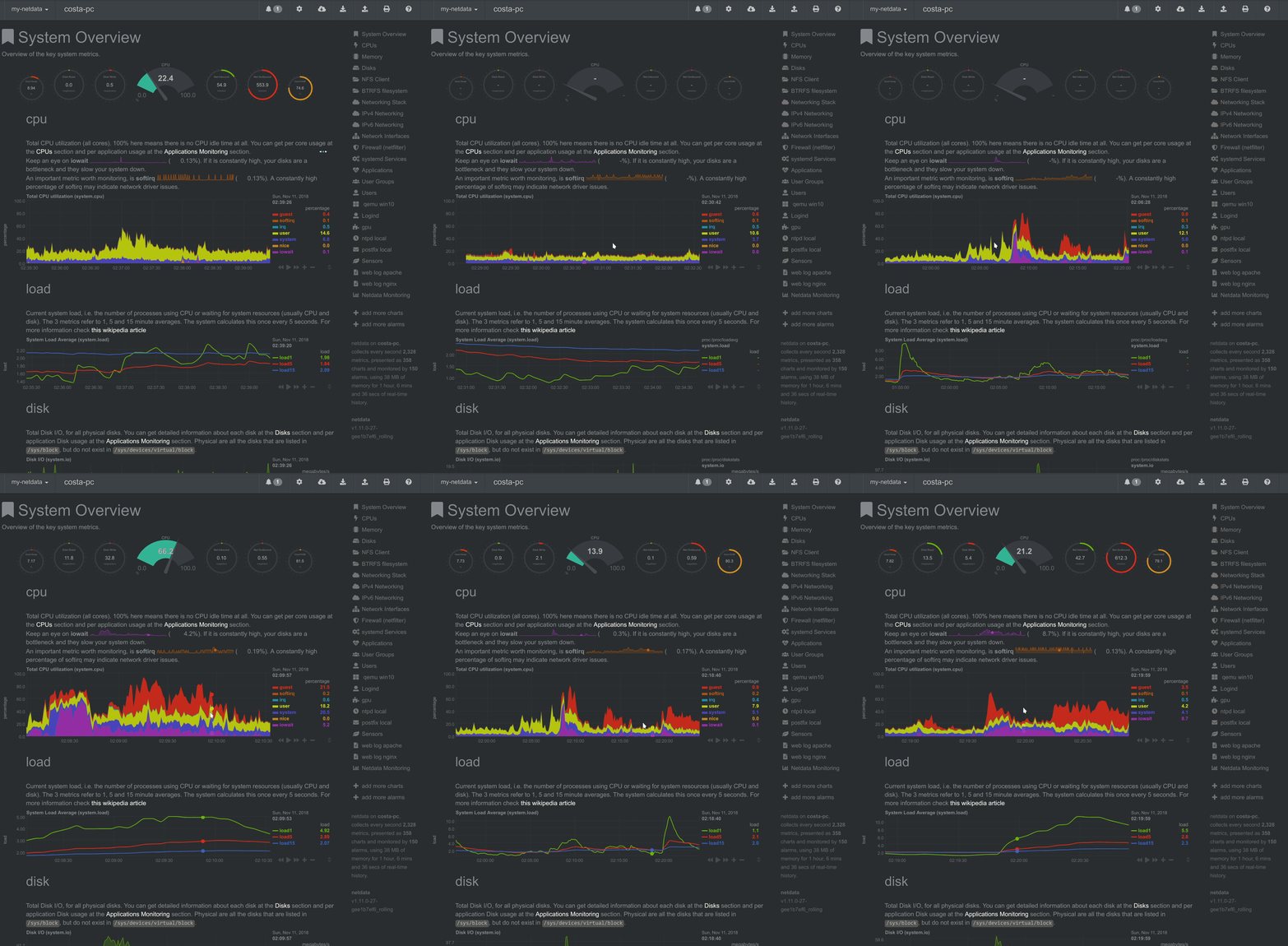
The charts support navigation through historical time ranges, allowing users to zoom into specific periods and compare activity across monitored resources. This makes it easier to investigate sudden CPU spikes, memory pressure, unusual network traffic, or changes in application response times.
Users can also explore the Netdata website to learn about its current monitoring platform and available demonstrations.
Netdata uses monitoring agents and independent collection workers to gather metrics from system resources and supported applications. Its architecture combines data collection, storage, health checks, streaming, and visualization.
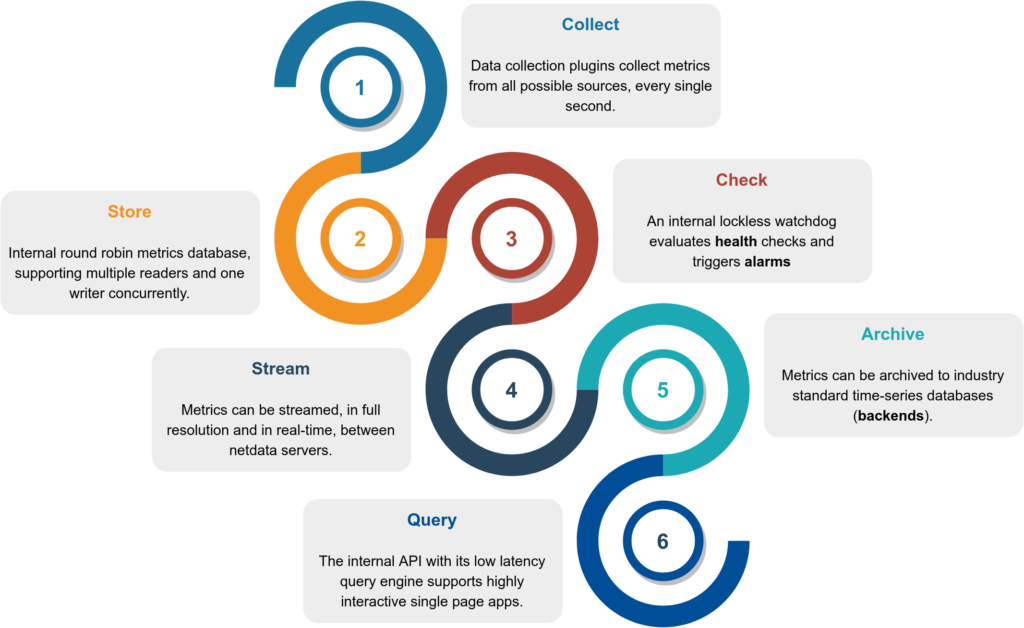
The monitoring process can be understood through six main stages:
Netdata collects detailed metrics from supported systems and applications. Depending on the collector and configuration, monitoring can cover CPU utilization, memory consumption, disk activity, network traffic, processes, and service performance.
The dashboard presents collected information through responsive charts and visualizations. Users can inspect individual metrics, navigate time ranges, and compare related performance indicators. The interface helps administrators identify unusual behavior without manually interpreting large volumes of raw monitoring data.

Netdata includes health monitoring capabilities that evaluate system and application metrics. Administrators can configure alert conditions and notification methods to receive warnings when monitored resources show unusual behavior or become unavailable.
Notification integrations and available delivery methods depend on the installed version and configuration. Teams should review the current documentation when connecting external notification services.
Netdata can monitor several areas of an infrastructure, including:
Netdata supports a modular collection architecture. Developers and administrators can extend monitoring by integrating additional data sources through supported collectors and APIs. This allows teams to monitor application-specific metrics alongside operating system information.
Netdata can also integrate with external monitoring and data platforms. The exact integrations and export options depend on the current release and deployment model.
Netdata provides installation instructions for supported Linux distributions and deployment environments. The project offers an installation script, but administrators should review the script and its permissions before executing it, particularly on production systems.
Start by checking the official installation documentation:
https://learn.netdata.cloud/docs/netdata-agent/installation
For source-based installation, review the current project instructions and prerequisites before cloning or building the agent. Installation requirements can change between releases, so older commands from historical tutorials may no longer be appropriate.
Netdata can also run as a Docker container. Container deployment provides an alternative to installing the agent directly on the host, although monitoring host-level resources may require access to specific system directories and capabilities.
The original article demonstrates a Docker deployment using host mounts and additional privileges. These settings should not be copied blindly into production because access to host process information, system files, and the Docker socket can create security risks.
Consult the official Netdata Docker installation guide for current configuration options. Apply only the permissions and mounts required for the metrics you intend to collect.
Netdata is a useful option for administrators who need detailed visibility into system performance and application health. Its real-time dashboards, monitoring collectors, alerting capabilities, and integration options make it suitable for troubleshooting and infrastructure observability.
Visit the Netdata GitHub repository to explore its source code and development activity. For setup instructions, configuration details, and supported integrations, refer to the official Netdata documentation.
You can also explore our guide to Linux uptime commands to learn another useful way to check system availability and operating time.


.jpg "The Evolution of Online Finance Tools In a Tech-Driven World")


