

How EDR Killers Bypass Security Tools
By 0xSnow on March 19, 2026


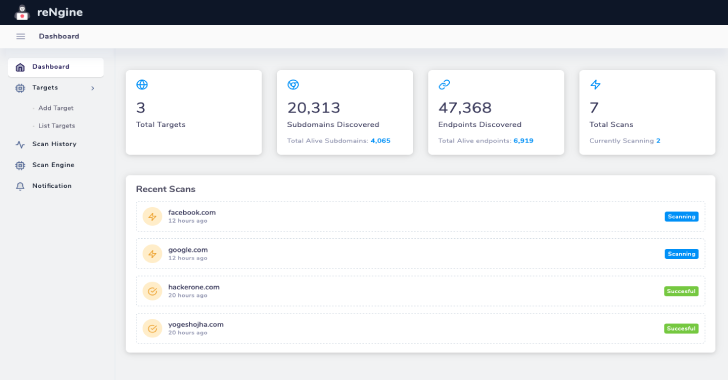
Reconnaissance across large web applications requires juggling multiple standalone command-line tools for asset discovery, endpoint parsing, and visual verification. Running tools in isolation scatters scan data across disparate text files and terminal windows. reNgine solves this friction by consolidating subdomain discovery, web crawling, and screenshot capture into a centralized, Docker-powered automation pipeline.
Created by security researcher Yogesh Ojha, this automated platform coordinates external tools through configurable scanning profiles. You can review updates, Docker configurations, and issue trackers on the official reNgine GitHub repository. Security analysts use the unified dashboard to quickly pinpoint attack surfaces across target domains.
The platform coordinates tasks through a microservices structure managed by Docker Compose. A Django web application delivers the management interface, while PostgreSQL stores target assets, discovered URLs, and historical scan data.
Asynchronous scan workers execute reconnaissance tasks in the background using Celery and Redis message queues. The engine coordinates network queries without freezing your active browser session.
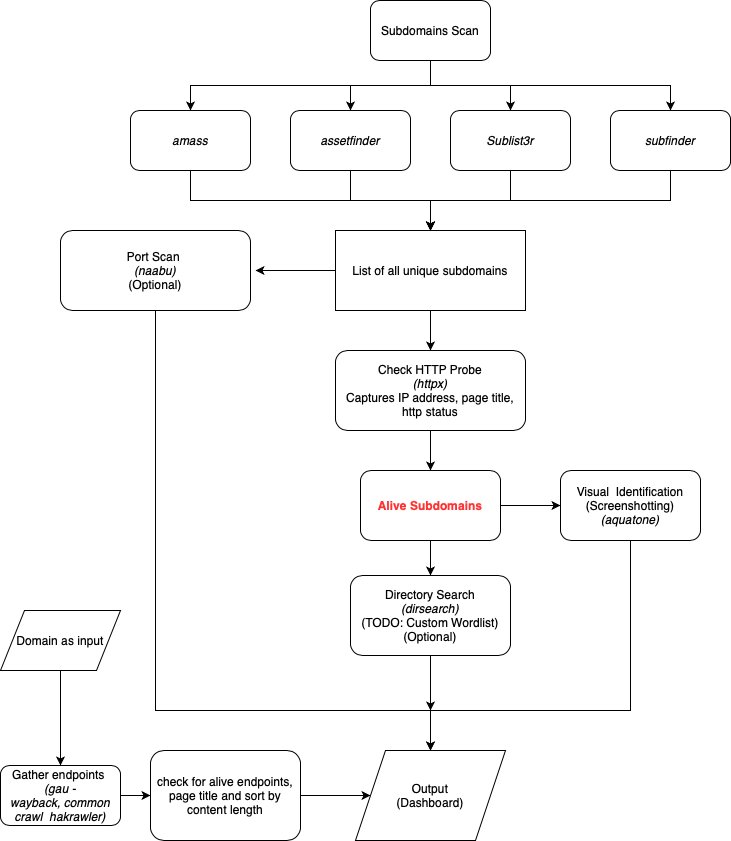
Reconnaissance runs across a tiered pipeline. It starts with passive asset discovery, expands into active port probing, runs endpoint collection, and wraps up with automated web screenshot captures.
| Component | Technology | Core Responsibility |
|---|---|---|
| Frontend & API | Django (Python) | User interface, scan engine customization, and target management |
| Task Queue | Celery & Redis | Background dispatch of multi-stage scanning tools |
| Database | PostgreSQL | Persistent indexing of domains, endpoints, and HTTP responses |
| Endpoint Harvesters | gau, hakrawler | Mining historical URLs from Common Crawl and the Wayback Machine |
Deploying reNgine requires Docker and Docker Compose on your host system. Running the setup inside containers isolates dozens of Go tools, Python packages, and headless browser binaries from your local environment.
# Clone the project repository and move into the source folder
git clone https://github.com/yogeshojha/rengine.git
cd rengine

# Build and start all container services
docker-compose up --build -d
Building the container images takes several minutes during the initial run. Once the terminal confirms all containers are healthy, initialize your administrative login account.
# Generate an administrator account via the Django management container
docker exec -it rengine_web_1 python manage.py createsuperuser
Follow the terminal prompts to choose a secure username and password. You can now access the web interface by navigating to http://localhost:8000 in your browser.
Creating a scan requires defining your root domain target and choosing an active scan engine profile. The engine initiates subdomain queries across multiple public certificate logs and search APIs.
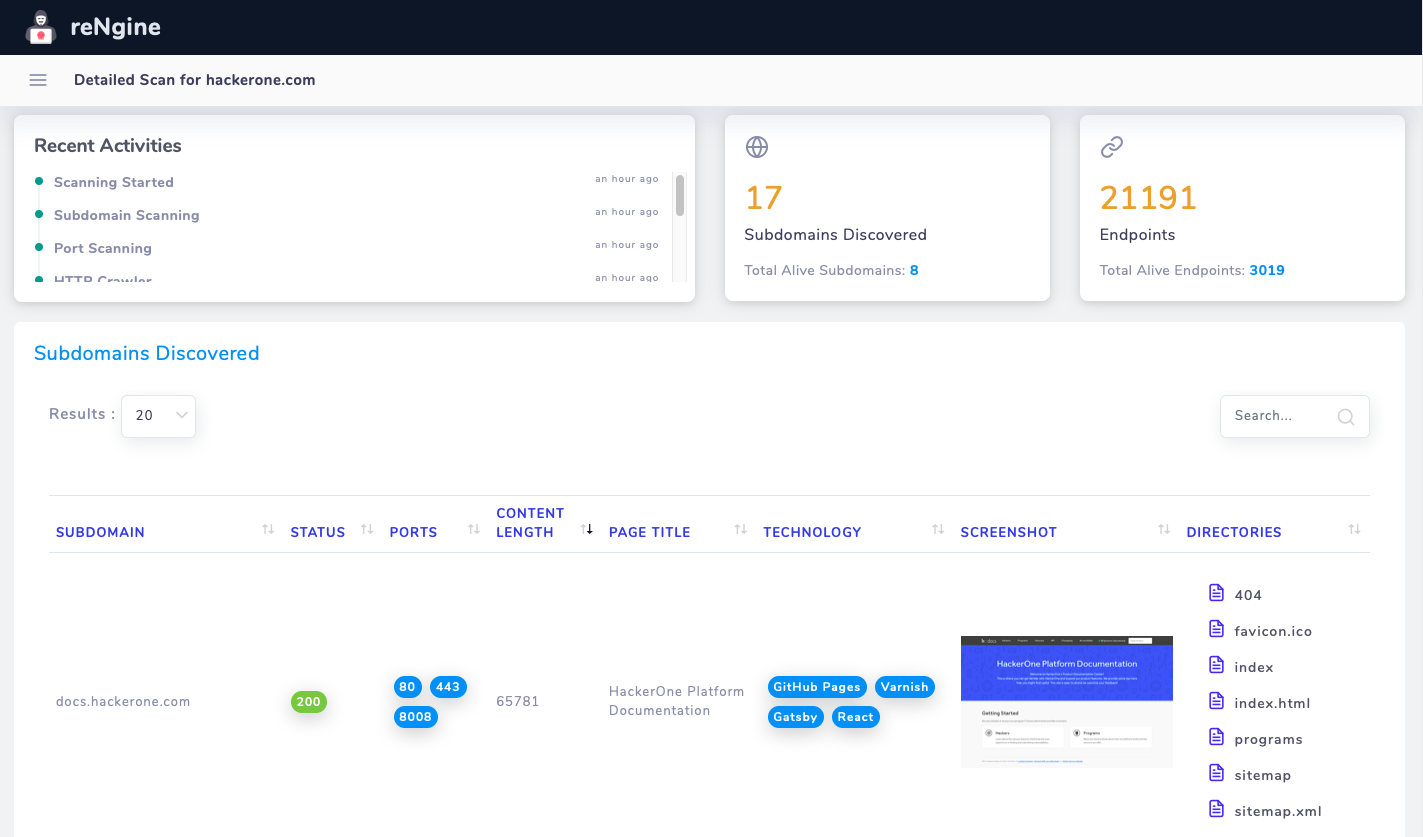
Discovered hosts undergo automated HTTP response filtering. Analysts can filter results by page title, server header, IP range, or status codes to prioritize high-value targets like staging servers or internal dashboards.
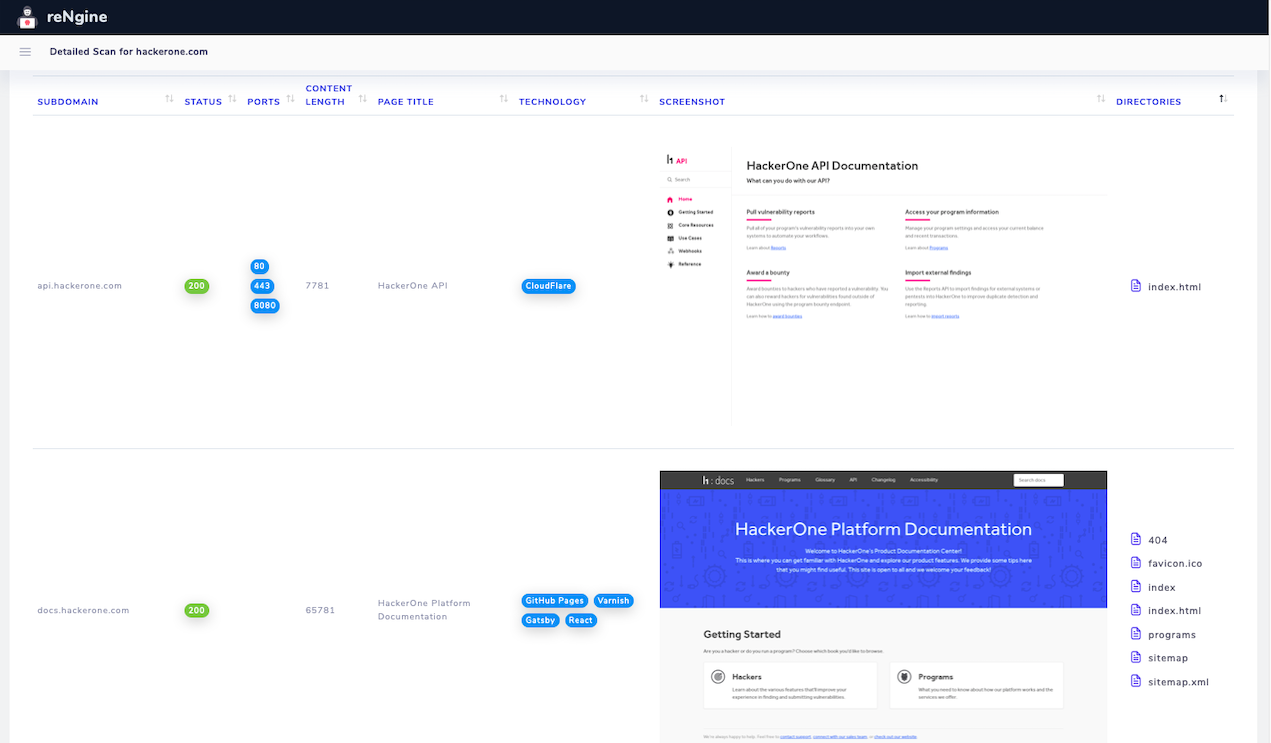
Active port probing highlights unusual listening services across responsive subdomains. For deep port inspection on specific IP ranges, security engineers pair these results with specialized port audits using Nmap.
Modern applications frequently expose forgotten API routes or vulnerable parameters across legacy subdomains. reNgine extracts historical URLs using utilities like gau and hakrawler, querying public indexes without generating noisy HTTP traffic on the target server.

The endpoint table includes built-in search filters for discovering vulnerability patterns. Searching for URL parameters containing =http reveals potential open redirect targets or Server-Side Request Forgery entry points.
Filtering by extensions such as .php, .json, or .bak helps locate unlinked configuration backups. The consolidated interface saves hours compared to inspecting raw terminal output manually.
Long-running reconnaissance tasks perform best on a remote cloud server. Running reNgine on an internet-facing virtual private server requires securing the administrative interface with HTTPS.
Place an Nginx reverse proxy in front of the application port. Configure incoming connections on port 443 with Let’s Encrypt certificates, routing traffic internally to port 8000. Managing local proxy settings mirrors standard reverse proxy setups tested with Nginx commands on production servers.
# Check Nginx service configuration status
sudo nginx -t

# Reload configuration to enable secure reverse proxy routing
sudo systemctl reload nginx
Always restrict dashboard access using firewall rules or IP allowlists. Limiting administrative access prevents unauthorized users from launching network scans from your server infrastructure.


.jpg "The Evolution of Online Finance Tools In a Tech-Driven World")


