

How EDR Killers Bypass Security Tools
By 0xSnow on March 19, 2026


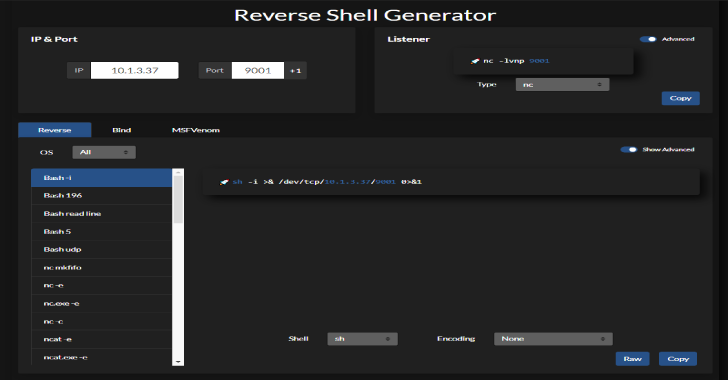
Reverse Shell Generator is a hosted web-based utility designed to generate reverse shell command templates and common listener configurations for authorized penetration testing and security lab exercises. It brings several useful options into one interface, helping security professionals prepare test commands without manually assembling every parameter.
The tool includes raw output support, URI and Base64 encoding, configurable listening ports, and interface preferences. These features make it useful for controlled lab environments, capture-the-flag (CTF) challenges, and authorized security assessments.
The generator provides templates for common reverse shell commands and listener configurations. Security testers can use these templates to prepare controlled test scenarios and understand how a target process may initiate an outbound connection to a listening system.
Raw mode supports retrieving shell output directly through a URL, including workflows that use cURL. This can help developers integrate generated content into their testing environment. Always review commands before execution, particularly when retrieving content from a remote service.
A port increment button increases the configured listening port by one. This small feature makes it easier to switch between test configurations when multiple services or lab exercises require different ports.
The tool supports URI and Base64 encoding for generated output. These formats are useful when testing how applications handle encoded input or when a command must be represented in a particular format. Encoding does not encrypt data or make a command safe to execute.
Reverse Shell Generator uses browser LocalStorage to persist configuration settings between visits. It also provides dark and light display modes, allowing users to select their preferred interface. Avoid storing sensitive credentials or secrets in browser storage.
The project source code is available on GitHub. Review the repository for the latest setup instructions, implementation details, and supported functionality before using or modifying the tool.
Project repository: Reverse Shell Generator on GitHub
For developers modifying server-side functions, the project recommends using Netlify’s local development environment. This is particularly relevant to features such as raw-link support.
npx netlify dev
Run the command from the project directory after installing the project’s required dependencies. Consult the repository documentation for the complete setup process and any environment variables the application requires.
Reverse shell commands can provide remote command execution, so use generated templates only on systems you own or have explicit permission to test. Prefer an isolated virtual machine or dedicated lab, review each command before running it, and restrict listener access to trusted test networks.
For additional network assessment techniques, see our guide to Nmap network scanning. Combining controlled testing with careful network analysis can help security professionals identify exposure without affecting systems outside the assessment scope.


.jpg "The Evolution of Online Finance Tools In a Tech-Driven World")


