

How EDR Killers Bypass Security Tools
By 0xSnow on March 19, 2026


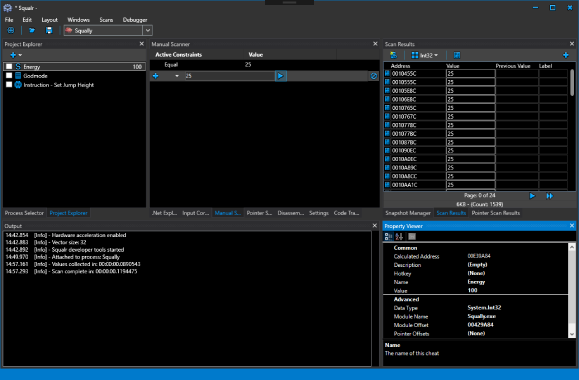
Squalr is a Windows memory editor and game-hacking research tool written in C#. It allows users to inspect application memory, search for values, examine pointers, and develop custom modifications for compatible desktop games. The project combines a graphical interface with scripting capabilities and reusable .NET packages.
Its engine supports memory scanning, memory reads and writes, x86/x64 assembly and disassembly, and debugging features. Developers can also integrate individual engine components into their own C# applications through the available NuGet packages.
Squalr focuses on fast memory searches through multithreading and SIMD (Single Instruction, Multiple Data) operations. SIMD allows a processor to perform certain operations on multiple data elements in parallel, reducing the time required for suitable scanning workloads.
The performance benefits depend on processor capabilities. The original project documentation identifies SSE, AVX, and AVX-512 support as relevant instruction-set requirements. Actual performance also varies with memory size, scan constraints, and system hardware.
The project documentation describes three primary ways to work with Squalr:
The following examples illustrate the API patterns documented by the project. They are intended for authorised testing against applications you own or are permitted to inspect. Namespaces and method signatures may differ between project versions.
Applications using the NuGet packages can subscribe to engine log events. Capturing these messages helps developers understand engine activity and troubleshoot integration problems.
using Squalr.Engine.Logging;

// Subscribe to engine output
Logger.Subscribe(new EngineLogEvents());

class EngineLogEvents : ILoggerObserver
{
    public void OnLogEvent(
        LogLevel logLevel,
        string message,
        string innerMessage)
    {
        Console.WriteLine(message);
        Console.WriteLine(innerMessage);
    }
}
The process-management API exposes information about available processes and provides an interface for selecting a target process. Process access should be restricted to applications used in an authorised testing environment.
using Squalr.Engine.OS;

IEnumerable<Process> processes =
    Processes.Default.GetProcesses();

// Select an authorised test process
Process process = processes.FirstOrDefault();
Squalr includes engine components for inspecting virtual memory regions and loaded modules. These capabilities are useful for understanding application memory layouts and studying how Windows processes organise their address spaces.
The architecture components support x86 and x64 instruction assembly and disassembly. The original documentation identifies NASM-related functionality as part of the assembly workflow.
This functionality helps developers examine machine instructions and understand how compiled application code is represented at the processor level.
The scanning engine provides APIs for collecting memory snapshots, applying constraints, and comparing values across scans. Its snapshot model supports tracking current and previous values, helping researchers narrow down memory locations during controlled experiments.
The debugging components also include code-tracing and breakpoint-related functionality. These features can help identify where particular values are accessed or modified in an authorised test application.
The original build documentation identifies Visual Studio 2017 as the development environment. It also notes that the project frequently updates its .NET framework requirements, so the documented toolchain should be treated as historical rather than a guarantee of compatibility with current Visual Studio releases.
The project lists several third-party libraries used across its interface and engine:
The original project documentation also describes several proposed improvements. These include evaluating AsmJit for x86/x64 assembly, adding hex-editor functionality, exploring OpenTK for graphics integration, and expanding packet-inspection capabilities through SharpPcap and Packet.Net.
These entries represent planned features in the source documentation, not confirmation that they are available in the current release.
Memory editors can support legitimate debugging, reverse engineering, software testing, and game-development research. However, modifying third-party games or applications without permission may violate their terms of service or interfere with anti-cheat systems.
Use Squalr only with software you own or are authorised to test. For related security research tools, see our guide to open-source OSINT and security tools.
Consult the project’s documentation and source repository for available builds, API references, dependency information, and installation guidance. Check the repository’s maintenance status and compatibility requirements before downloading or building an older release.


