


How EDR Killers Bypass Security Tools
By 0xSnow on March 19, 2026


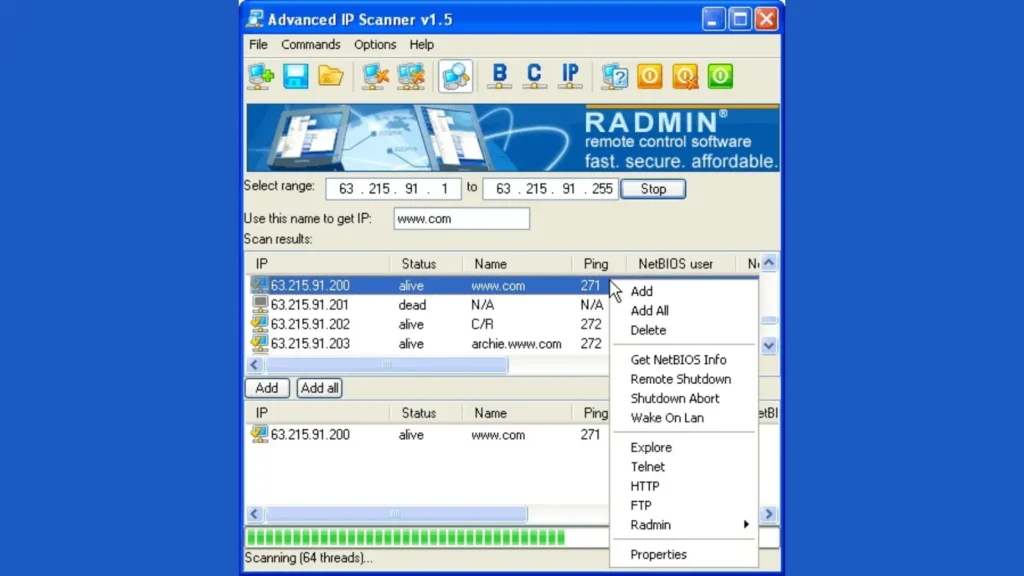
Famatech Advanced IP Scanner and Advanced Port Scanner are free network utilities designed to help administrators discover devices, inspect open ports, and troubleshoot local network issues. Although both tools support network management, they focus on different tasks. Advanced IP Scanner identifies active devices on a local network, while Advanced Port Scanner examines ports and the services accessible through them.
These tools can support routine network administration, asset discovery, and authorized security assessments. Administrators should scan only networks and devices they own or have explicit permission to assess.
Advanced IP Scanner is a free network discovery tool for Windows that scans IP address ranges within a Local Area Network (LAN). It identifies active devices and displays useful information, helping administrators understand which systems are connected to their network.
Its main features include:
Advanced IP Scanner is useful for maintaining an inventory of connected devices, investigating connectivity problems, and identifying unfamiliar systems that require further review. A discovered device is not automatically unauthorized, so administrators should verify its identity before taking action.
Advanced Port Scanner is a free Windows utility that checks network devices for open ports. Ports help applications and services communicate over a network, but unnecessary or incorrectly configured services can increase an organization’s attack surface.
Its key capabilities include:
Network administrators can use Advanced Port Scanner to investigate exposed services, check whether expected ports are accessible, and identify systems that may need configuration changes. An open port does not necessarily indicate a vulnerability; its risk depends on the service, configuration, exposure, and applicable security controls.
| Feature | Advanced IP Scanner | Advanced Port Scanner |
|---|---|---|
| Primary purpose | Discover devices on a network | Inspect accessible ports on network devices |
| Main information | IP addresses, MAC addresses, and available shared resources | Open ports and identifiable services |
| Typical use | Network inventory and connectivity troubleshooting | Service exposure checks and port analysis |
| Remote administration | Radmin integration and supported network functions | Supported remote access and command execution features |
Start with Advanced IP Scanner when you need to discover which devices are responding on a local network. Use Advanced Port Scanner when you need to examine the ports exposed by a known host. Together, they can provide complementary information during routine network maintenance and authorized security testing.
Unexpected scan activity may indicate troubleshooting, inventory work, or a security assessment, but it can also warrant investigation. Review network logs alongside asset inventories, approved testing schedules, and administrator activity before classifying a scan as malicious.
For broader network reconnaissance, see this guide to website OSINT tools and reconnaissance techniques. Use scanning tools within an approved scope, follow organizational policies, and document findings so that exposed services and unfamiliar devices can be reviewed appropriately.


.jpg "The Evolution of Online Finance Tools In a Tech-Driven World")


.jpg "How UDP Works and Why It Is So Fast")